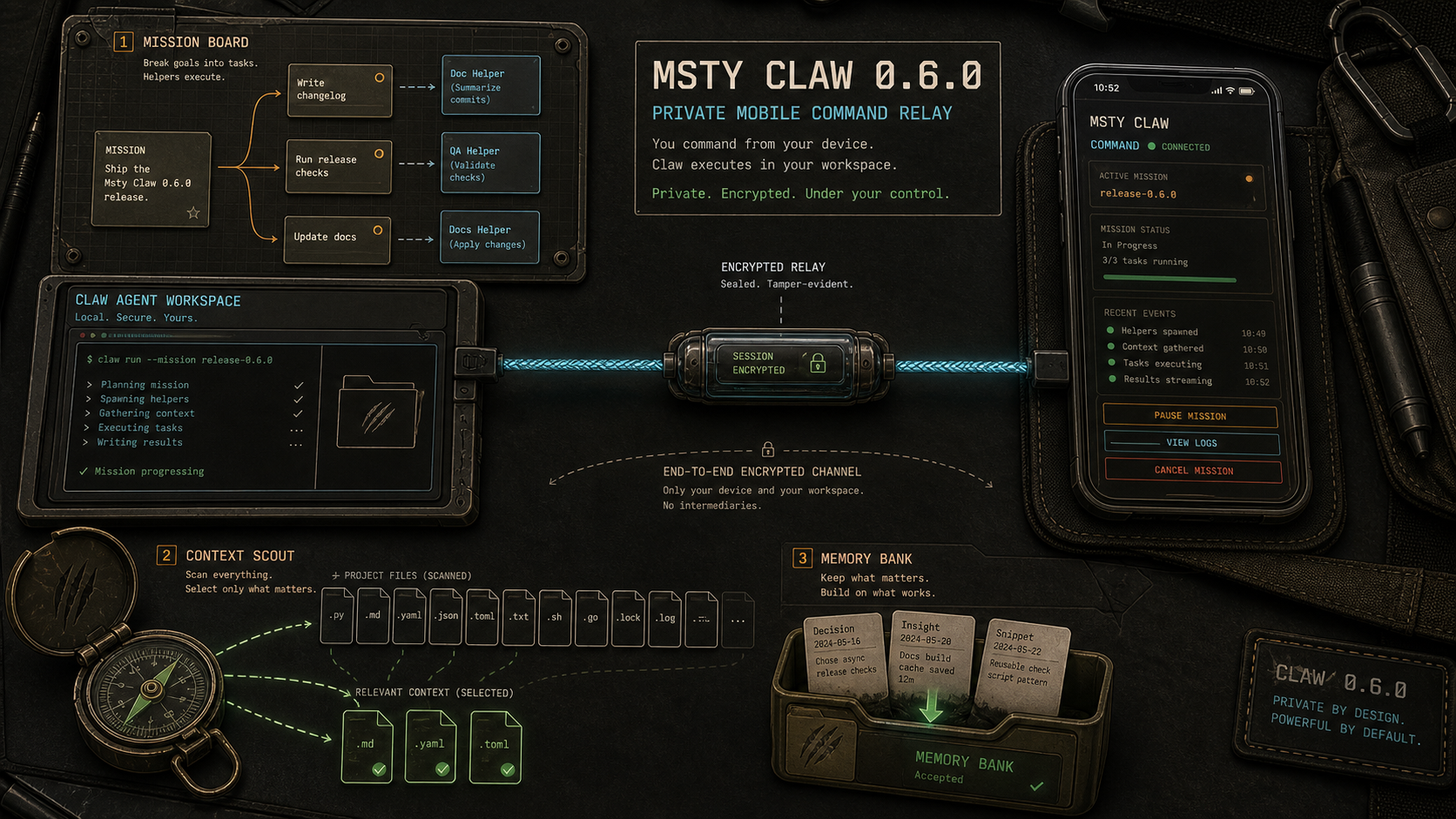
Claw 0.6.0 shipped last week. This is the first release where I stopped thinking of it as a chat tool with agent features and started reaching for it the way I reach for a terminal — something I keep open because I will need it again in ten minutes.
Four features did that:
- Mission Control — sub-agents without the ceremony
- Msty Claw Go — a mobile app for talking to your desktop agents
- Context Scout — finds relevant files before you burn tokens on discovery turns
- Chat folders with memory and a Memory Inbox
The mobile app is the one I almost did not build.
We already had WhatsApp, Telegram, and Discord bridges for remote Claw access. They work, in the same way a screwdriver works as a chisel. Setup is painful. The UIs are not built for rich Markdown, let alone agent-specific things like plan lists, task status, or approval flows. You can only pretend a chat app is an agent workspace for so long before the cracks show.
And then there is the privacy angle. I do not want my personal assistant routing through Meta’s surfaces. Whatever the privacy policy says, I assume anything near that ecosystem is hungry for signal. I have not had Instagram or Facebook on my phone in years and I am not interested in finding out what the background services were quietly learning. Your threshold may vary. Mine is low.
Msty Claw Go connects to your desktop agents directly. QR setup, end-to-end encryption. We run a small relay to move messages between devices, but the relay cannot read the contents. When the thing on the other end has access to your files, notes, and task context, that distinction is not theoretical.
The UI also gets to be honest now. Task runs, shortcuts, folders, status, Markdown rendering — none of it has to be smuggled through someone else’s chat interface as contraband.
I was genuinely unsure about maintaining another app. Mobile apps look small on a roadmap and then quietly eat a team. Adam pushed for it. He was right. This is the first time “personal assistant in your pocket” is not something I have to qualify.
Context Scout is the feature I notice most day to day.
Before 0.6.0, starting a workspace agent session often went like this:
- agent searches for relevant files
- picks a few wrong ones
- asks for clarification
- you paste more context
- all of that back-and-forth lands in the context window
- by the time the model is actually working, the window is half full of lint
Context Scout runs a pre-flight step. It looks at the task, finds likely relevant files and code maps, shows you what it picked, and lets you edit before anything goes to the model. You can use a smaller, cheaper model for discovery and save the expensive one for the actual work. But the bigger win is starting with cleaner context. The model gets a better hint and less junk.
It is not always perfect at picking the right files. But a decent first guess beats five turns of “can you also check this file.”
Mission Control and folder memory pull in the same direction. Mission Control gives multi-step work a home instead of scattering helper runs across normal chats. Folder memory lets a folder learn from accepted memory suggestions and carry that context into new chats in the same area. Neither one is flashy alone. Together they make Claw feel less like a chat window with tools bolted on and more like a place where ongoing work actually lives.
The rest is cleanup: per-task model assignment, better local model discovery for Ollama and Hugging Face models, source attribution on web search answers, stronger instruction handling, fewer long-running task failures.
I keep going back to one pattern across this release. Every major feature is trying to remove a tax. Less setup tax on mobile. Less context tax before a task starts. Less coordination tax when work needs helpers. Less memory tax when a topic spans several chats.
Remove enough of those and the assistant stops feeling like a demo.