OpenAI quietly released Privacy Filter, and I am still a little surprised it exists.
It is not a chatbot. It does not write text. It has one job: scan text and mark spans that look like personally identifiable information.
The model card calls it:
fast, context-aware, and tunable
At Msty, we are working on integrating it into Msty Claw first, then Msty Studio.
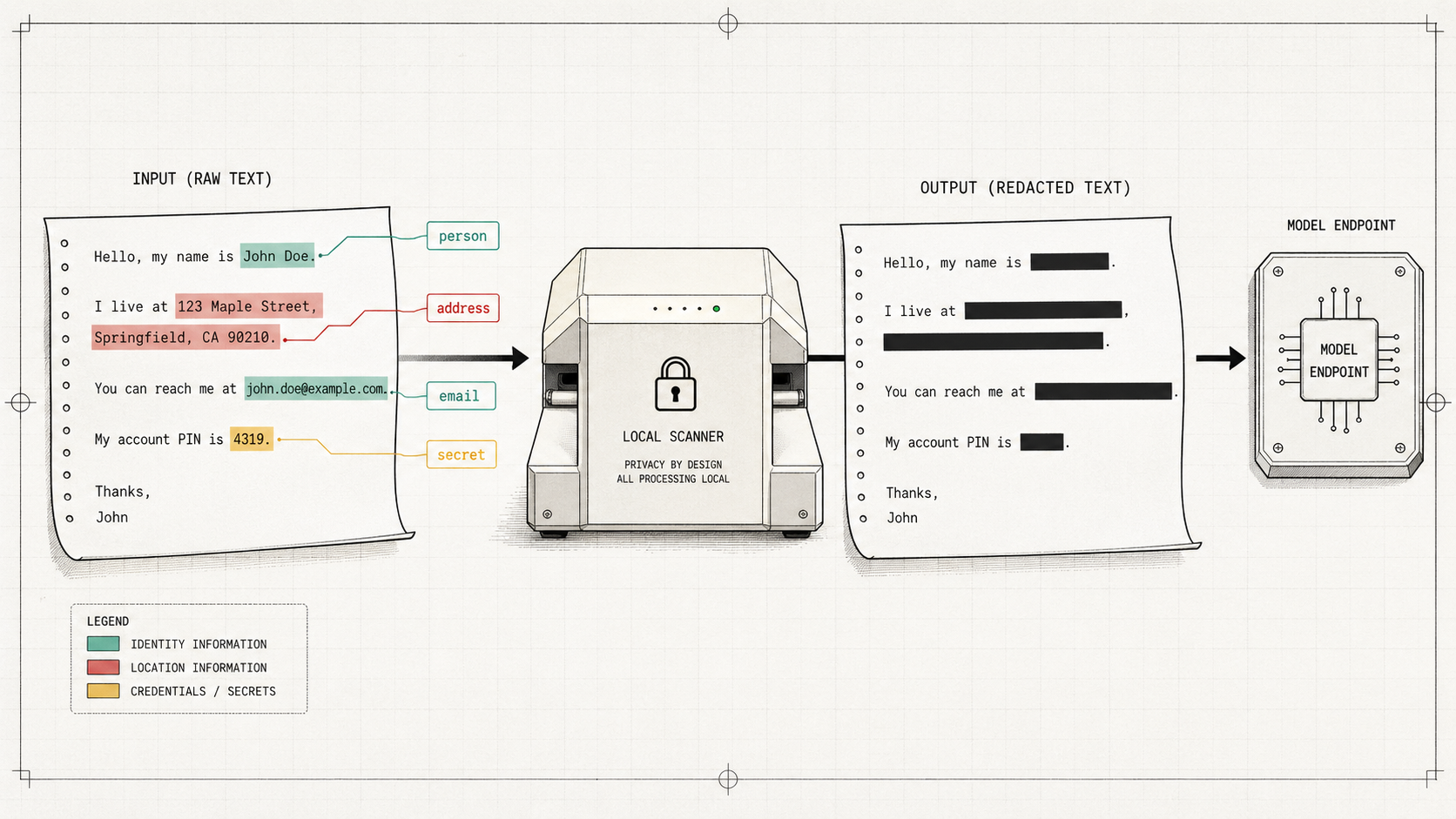
My mental model for the feature is simple: a local privacy highlighter that runs before text leaves the machine.
user text
-> local privacy scan
-> erase or review sensitive spans
-> send cleaned text to the selected model
For the user, I do not want this to feel like a compliance dashboard. Per chat, turn on the PII eraser. That conversation now gets a local privacy pass before anything goes to the model.
Why Regex Is Not Enough
Regex still works well for obvious shapes:
sam@example.com
555-0100
sk_live_...
The messier cases need context.
Order number: 123456789
Account number: 123456789
Call me at 123456789
A regex sees a number. A contextual model can look at nearby words and decide whether the span looks like an order ID, account number, phone number, or nothing private at all.
This is the part that made the model feel useful for an AI app. People paste weird chunks of real life into chat boxes: support transcripts, project notes, customer emails, logs, legal notes, and messy docs. The private parts are not always shaped like clean examples.
What The Model Returns
OpenAI Privacy Filter is a token-classification model. The input text is split into tokens, and the model labels those tokens.
The public categories are intentionally narrow:
account_numberprivate_addressprivate_emailprivate_personprivate_phoneprivate_urlprivate_datesecret
So this:
Hey Sarah, can you send the invoice to 42 Oak Street? My backup email is sam@example.com.
can become:
Sarah           -> private_person
42 Oak Street   -> private_address
sam@example.com -> private_email
That output shape is exactly what an app needs. Not a paragraph explaining risk. Just spans the UI can highlight, redact, or ask the user to confirm.
Small, But Not Tiny
The Hugging Face docs say the model has:
- 1.5B total parameters
- 50M active parameters
- Apache 2.0 license
- 128,000-token context window
- browser and laptop runtime support
The total-vs-active parameter detail can sound like model accounting nonsense. The rough mental model is a reference library.
The full checkpoint is the whole library: 1.5B parameters worth of shelves. For each token, a router sends work to 4 relevant expert desks out of 128. Those are the active experts. The model can be larger on disk while each token only uses a smaller working path, around 50M active parameters.
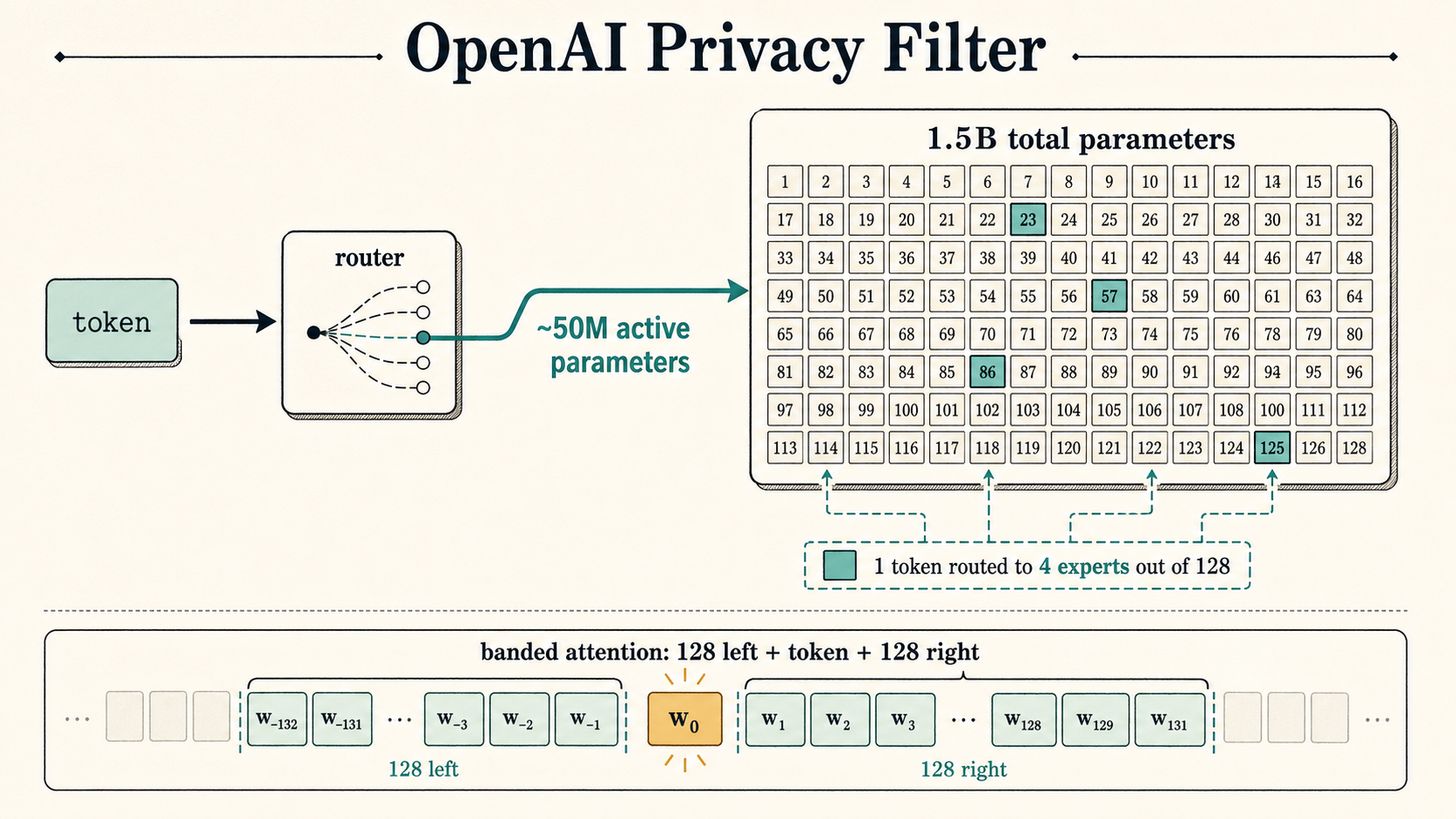
Under that analogy, it is still a real transformer: 8 transformer blocks, grouped-query attention, rotary positional embeddings, 128 experts, top-4 routing, and a 640-wide residual stream.
So no, this is not a fancy regex wrapper.
It also uses banded attention. Each token mostly looks around its local neighborhood instead of comparing itself to every other token in the whole document. The band size is 128, which gives each token an effective local window of 257 tokens including itself.
That fits PII detection pretty well. In:
Account number: 84729103
the useful clue is right next to the number. The model usually does not need to compare that number to a sentence 50 pages later.
The Runtime Shape Is Different
“Local model” usually makes people think of llama.cpp or Ollama. Those are great for the common chat-model loop:
prompt in
-> model generates tokens
-> text streams back
Privacy Filter is a different loop:
text in
-> model labels tokens
-> decoder returns spans
So the runtime stack is different too:
ONNX file        = packaged model
ONNX Runtime    = engine that runs it
Transformers.js = JavaScript API around the pipeline
ONNX is the portable model format. ONNX Runtime runs the packaged graph and weights across platforms. Transformers.js gives JavaScript apps a Hugging Face-style API and uses ONNX Runtime in the browser.
For this feature, that matters. We do not need a local chat server to generate text. We need tokenizer alignment, token-classification outputs, span decoding, and redaction behavior close to the message composer.
Cleaning Up Spans
The model does not only predict the privacy category. It also predicts where each token sits inside the span.
A two-token name might look like:
Sarah  -> B-private_person
Connor -> E-private_person
A longer address:
42       -> B-private_address
Oak      -> I-private_address
Street   -> E-private_address
A one-token email:
sam@example.com -> S-private_email
Normal text:
please -> O
The tagging scheme is BIOES:
B = beginning
I = inside
O = outside
E = end
S = single-token span
For 8 privacy categories, the tag vocabulary works out to:
8 privacy categories * 4 private positions = 32 private labels
32 private labels + 1 outside label = 33 total labels
The number is less important than the behavior. The model can say both what a span is and where it begins and ends.
Then Viterbi decoding cleans up the token-level guesses. I think of it as turning a messy highlighter pass into a coherent highlight:
bad:  42 [Oak] [Street]
good: [42 Oak Street]
Users should not see token noise. They should see clean spans.
Context Can Flip Meaning
The model is bidirectional, so it can use context on both sides of a token.
Jordan signed the contract.
Air Jordan is on sale.
Same word. Different meaning.
Privacy has worse versions of that problem:
My password is river-stone-77.
The phrase "river-stone-77" appears in the poem.
The same string can be a secret in one sentence and harmless in another. Regex has no idea. A contextual classifier at least has a chance.
How I Want It To Feel In Msty
I want this feature to feel boring.
Per chat, toggle it on. Paste a support transcript, customer email, project brief, or legal note. The scanner runs locally, finds likely private spans, and the app can erase or review them before sending the cleaned text to the selected model.
I do not think this should be global all the time. You may want privacy filtering for a customer thread and not for a throwaway scratchpad. Per-chat control keeps it useful without turning every prompt into paperwork.
Internally, we can keep confidence scores and categories. The user mostly needs:
Found 3 sensitive spans:
- person
- address
- email
Then the UI can decide whether to highlight, redact, or ask.
Do Not Oversell It
OpenAI is careful about the claim. The model card calls Privacy Filter a:
redaction and data minimization aid
Aid is the right word.
It can miss things. It can over-redact. It may behave differently across languages, domains, weird formatting, synthetic examples, uncommon names, and project-specific secrets.
For high-sensitivity domains, you still need policy, evaluation, and review. A model like this reduces accidental leakage. It does not magically turn an AI app into a compliance program.
My rule of thumb for now:
Regex catches obvious shapes.
Privacy Filter catches nearby context.
Viterbi cleans up the spans.
Local runtime keeps the scan close to the data.
I want that layer in front of text before it starts moving around.